


Hudson River Rick
-
Posts
479 -
Joined
-
Last visited
-
Days Won
2
Content Type
Store
Profiles
How-To & Articles
Scroll Saw Reviews
Clubs & Organizations
Clubs & Organizations International
Pattern Shop
Suppliers
Village University
Help Desk
Forums
Gallery
eBooks
Everything posted by Hudson River Rick
-
@MarieC Beautiful job on an outstanding pattern. I have tried to find the pattern, but have had no luck. Does anyone know if Dan(fish) has made the pattern available. Marie, THANKS FOR SHARING. Rick
-
@WayneG Nice cutting on a great tribute piece. THANKS FOR SHARING. Rick
-
2 x4 challenge Happy Easter
Hudson River Rick replied to don in brooklin on's topic in Bragging Rights
@don in brooklin on Great job on a fun pattern, Don. I'll bet the club members tried to find the 2 x 4. Thanks for sharing. Rick -
@Charlie E There he goes again folks. GREAT job on a nice pattern Charlie, and the perfect piece of live edge. Thanks for sharing. Rick
-
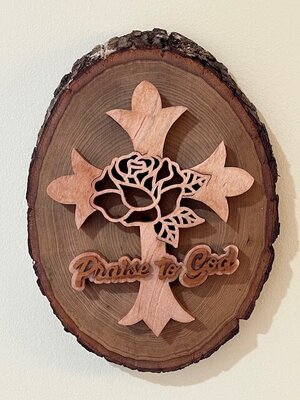
Found this pattern on Steve's site and it was atime when we really neded the support from the image. Thanls for looking.
- 109 replies
-
- 11
-

-
- scroll saw challenge
- january
- (and 4 more)
-
REST IN PEACE dear friend. Not too long ago you remarked on your daily post, that you were so happy that you & Patty got to move back to be near family. I'm so glad that gift was granted to you. Blessings to your family, and THANK YOU FOR ALL YOU GAVE TO US. Rick
-
Church project: Tenebrae Candelabra
Hudson River Rick replied to Kris Martinson's topic in Bragging Rights
@Kris Martinson Bautiful job Chris. I'm sure the other parishoners will thank youfor it. THNAKS FOR SHARING. Rick -
@Charlie E Charlie, it's only February, and I'm running out of words of praise for your work. Thanks for sharing. Rick
-
@heppnerguy Dick, what substrate are you using, I asume it's Baltic Birch. If that is the case, does the paint raise the fibers on the plywood? You are moving right along on your new journey. Thanks for sharing. Rick
-
@heppnerguy That is a great job on the coloring, Dick. Keep up the GOOD work. Thanks for sharing. Rick
-
@Fish Great cutting of a beautiful pattern. I too, would like to find that pattern. Thanks for sharing. Rick
-
YUMMM. Allen, the bagels look delicious too. Thanks for sharing. Rick
-
Commissioned Box to celebrate 250 years.
Hudson River Rick replied to Dave Monk's topic in Bragging Rights
@Dave Monk Your patron certainly knew who to choose to do this unbelievable piece of art, you continue to amaze me with each new piece. Thanks for sharing. -
Sanding Small Pieces Tips Needed
Hudson River Rick replied to kmmcrafts's topic in General Scroll Sawing
@JTTHECLOCKMAN REAL NICE work John. The pool table is remarkable. Thanks for sharing. Rick -
@Charlie E You did it again Charlie. Beautiful cutting of a great pattern!!! What is the thickness of the cedar? Thanks for sharing. Rick
-
INKSCAPE strikes again !!!
Hudson River Rick replied to Hudson River Rick's topic in General Scroll Sawing
@rash_powder Thanks for coming back withthat reply. I mistakenly found the same solution as you, and yes, it did work. Most of the time. I have been getting beat up by inkscape for about 5 years. The folks on this forum are the best, they walked me through a lot of crazy problems I experienced, and I thank everyone for being there. Inkscape & I are about to go into divorice court, I'm too old to continue getting beat up. I will continue to purchase patterns and occasionally find stuff on PINTREST. MERRY CHRISTMAS TO EVERYONE, LOVE THE ONES YOU'RE WITH. -
This years Christmas ornaments
Hudson River Rick replied to Hudson River Rick's topic in General Scroll Sawing
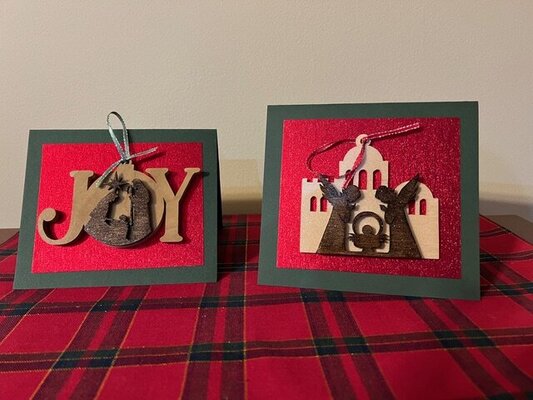
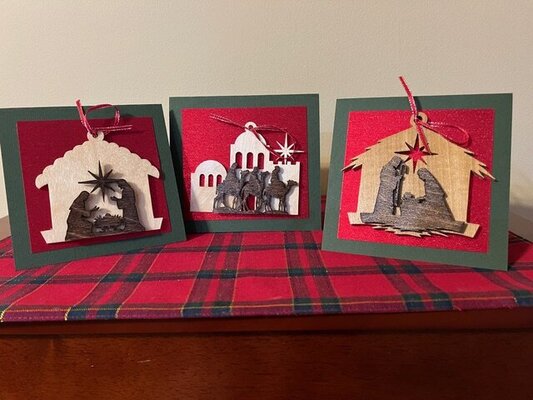
Thanks again to all you very kind folks. The ornaments are 2 pieces, the background is a separate cut and then the Nativity and other Christmas images are cut out and raised on the background using very small pieces of 1/8 inch BB plywood. The top images are sprayed with a light coat of siver sparkle. Rick -
This years Christmas ornaments
Hudson River Rick replied to Hudson River Rick's topic in General Scroll Sawing
Thank you all for the kind words. Rick -
Hi everyone, well we are getting the first snow of the season here in the Hudson Valley of NY, and it looks like it will be a real mess. Anyway I would like to share a few pictures of the patterns Ann Marie picked out for this years ornament card. This is a series of 9 images that were sold as laser patterns, I had to change some of the patterns because they were so smallthat I couldn't cut them on the scroll saw. Thanks for looking. Rick
- 9 replies
-
- 13
-
-
@Scrappile Thank you Paul, for sharing your source. Snowing like crazy here in the Hudson Valley of NY, wet & heavy. Have a great day' Rick
-
@Scrappile Great job on a beautiful card. I just finished 37 cards for our family and close friends, in fact my wife is at the Post Office as we speak, sending them on their way. The pattern I used was a modified laser pattern that Ann Marie purchased off of eBay, when she gets back home, I will ask her to take some pictures so I can share them with everyone. Paul, do you mind sharing where you found the pattern you used for this years card? Thanks for sharing your pictures. Wishing you & your family a very Merry Christmas. Rick
-
Noah’s Ark Tea-Light Stand – Original Design
Hudson River Rick replied to rafairchild2's topic in Bragging Rights
@rafairchild2 Real nice job on the pattern and the cutting. If that's a gift, someone is going to be real happy. Thanks for sharing. Rick -
I'm with J. T. on this subject. I recently ordered more 1/8 inch BALTIC BIRCH plywood from Ocooch Hardwoods. The material is much better than most other suppliers that I have used, and the company service is better than any other. Rick
-
@Scrappile You are absolutely correct on your statement about BB plwood. I just bought a bunch of it and itis real junk compared to what I bout 3 years ago. Makes you wonder if it really is BALTIC BIRCH, or some loacl made knockoff. Rick
-
INKSCAPE strikes again !!!
Hudson River Rick replied to Hudson River Rick's topic in General Scroll Sawing
@rash_powder Thank you so much for your guidance, I am pretty much done with inkscape. It is a very powerful app for anyone who is computer savey. I used it mostly to change the color of the outline of the pattern drawings, This latest incident accured when I tried to make text follow the outside of a circular pattern, not be attached to the circle. OH WELL !!!


