


Hudson River Rick
-
Posts
479 -
Joined
-
Last visited
-
Days Won
2
Content Type
Store
Profiles
How-To & Articles
Scroll Saw Reviews
Clubs & Organizations
Clubs & Organizations International
Pattern Shop
Suppliers
Village University
Help Desk
Forums
Gallery
eBooks
Everything posted by Hudson River Rick
-
OUTSTANDING !!! Once again Kris, your design work & cutting are beyond ordinary. Thanks for sharing. Rick
-
INKSCAPE strikes again !!!
Hudson River Rick replied to Hudson River Rick's topic in General Scroll Sawing
@don in brooklin on Thank you Don. I will have to check to see if "live updates is clickd on. I do click on the image and I get the outlined box, but no image at the bottom of the Trace BitMap box. Rick -
Under The Tree - Scroll Saw Challenge
Hudson River Rick replied to Travis's topic in General Scroll Sawing
Hey Paul, you out did the the Big Ole Elf by a landslide. That is a very thoughtful gift to your family. Thanks for sharing. Rick- 62 replies
-
- 1
-

-
- under the tree
- scroll saw challenge
- (and 2 more)
-
Thank you all for th help on my last attempt to place lettering around a pattern, I couldn't get the process to work, but I did the verbage in a different way. In my last act of desparation, I am asking if anyone can tell me why my Path Trace Bitmap isn't working. I am guessing that I hit a key somewhere that doesn't play nice with Trace Bit Map. I freely admit that my fingers don't listen to what my small brain is trying to tell them to do. If I can't fix this one, the app will be removed from my iMAC. I have includd a screen shot of the Trace BitMap box, if there is anything obvious to you folks that neds to be changed, could you please share that info. By the way, I did remove the inkscape app and reinstall it, but the problem is the same. Thank you all sooo much for trying to help ME.

-
Under The Tree - Scroll Saw Challenge
Hudson River Rick replied to Travis's topic in General Scroll Sawing
@DickMira Dick, thanks for sharing your information on the TEDDY BEAR Rick- 62 replies
-
- 1
-

-
- under the tree
- scroll saw challenge
- (and 2 more)
-
Under The Tree - Scroll Saw Challenge
Hudson River Rick replied to Travis's topic in General Scroll Sawing
Dick, what a great gift for the little ones ! The cross was a very thoughtfu addition, is that your pattern? Thanks for sharing. Rick -
@don in brooklin on THANK YOU ! I am going to try what you suggest.
-
@don in brooklin onusn17.svg Here I am again folks, sorry to be a pain in the A*%#. I found this pattern on Steve Goods site, and would like to present it to a very close friend on Monday, Nov. 10. Veterans Day in the U.S. is Nov.11, but I won't be ableto see him then. I was able to use the text that I want, but I can't figure out how to make the text follow the image around the rope. If someone could help me with this problem I would appreciate it. Thanks in advance.
-
@Dave Monk Dave, another piece of outstanding design & cutting. Thanks for sharing. WOW Rick
-
@preprius Paul, that is some really nice cutting. Lettering is usually very difficult. Thanks for sharing. Rick
-
@Mike Crosa Great job Mike. The design and the cutting are top shelf. Thanks for sharing. Rick
-
This has been posted in 2 other scroll saw forums, sorry if it's a repeat read for anyone. I recently received an order for 1/8 inch BBplywood and several pieces of 1/4 inch project wood, from OCOOCH Hardwood. The flat package arrive with one of the corners ripped off, and obvious damag to the plywood, thank you careless delivery company. When we opened the box, I determined that I could work around the damage to the plywood edges, this is for Christmas ornaments, and the squares I start with are about 5 inch square. The project wood pieces, were all cupped and some were bowed, which pretty much made the unusable for our project. The complete order was wrapped in strech wrap and was carefully packaged. We made a call to OCOOCH and sent them photos of the damaged carton and the warped wood, they immediately offered to resend the entire order, I explained that I could use the plywood as is and accepted their offer to replace the project pieces. Sorry for the long post. I just wanted to share the experience of dealing with such a reputable company, and to encourage anyone who has to order by mail, to give them a try. Rick
- 1 reply
-
- 3
-
-
@Kris Martinson Anothr GREAT job Kris. Thanks for sharing.
-
@Kris Martinson I'm with Jerry on the WOW!!!, but I'm not sure that would do this artwork justice. Thanks for sharing. Rick
-
Halloween Gnome - AI generated
Hudson River Rick replied to don in brooklin on's topic in Bragging Rights
@Dave, that is a great Santa, thanks for sharing. The only AI thank I am aware of is what I amblessed with right now. Rick -
Halloween Gnome - AI generated
Hudson River Rick replied to don in brooklin on's topic in Bragging Rights
@don in brooklin on Thank you Don, I can't wait to try this. I am a self proclaimed GNOME-A-HOLIC.. Thanks for sharing. Rick -
Tip for doing pattern with backer
Hudson River Rick replied to don in brooklin on's topic in General Scroll Sawing
@don in brooklin on GREAT tip Don. Thanks for sharing. Rick -
My final try at INKSCAPE
Hudson River Rick replied to Hudson River Rick's topic in General Scroll Sawing
@Fab4Fab4(sorry, I couldn't find your name), you sir are an inkscape hero. I just tried what you said and to my surprise, it allowed me to open my old files. I am assuming, & we all know what that makes me, that my wandering fingers hit that key when I wasn't looking. THANK YOU so much. @don in brooklin onIf there is an inkscape Hall of Fame, you two guys are instantly inducted. Rick -
My final try at INKSCAPE
Hudson River Rick replied to Hudson River Rick's topic in General Scroll Sawing
@don in brooklin on Hi Don, thank you for the quick response. My wife purchased some Christmas ornament patterns off of e-bay, and to tell you the truth, I just wanted to put them into inkscape so I could change the black lines to red lines. I don't know if they are SVG or PNG, etc. The reason or my question is because I can no longer bring anything into the inkscape site. We deleted the inkscape program several times and each time, when I try to open a file, the same screen shows up, I can delete the red cross, I then get a blank working area, but I can not open anything. I'm thinking that there is a file on my mac that may be corrupted,and if that is the case I will try to find someone in my area to find the bad file and delete it. I am running a desk top Mac with the Sierra up date. Sorry for the long post, THANK YOU again for your help. Rick -
Good morning everyone, I have been in a 10 round, knockout fight with inkscape, and I am just about beat. I have deleted and reinstalled many times, and I still get the image that I will try to post. It is a RED X from corner to corner, I can erase it but I can't import anything. If anyone knows what the $%^&*is going on,can you please share it with us. Thank you all in advance. Rick
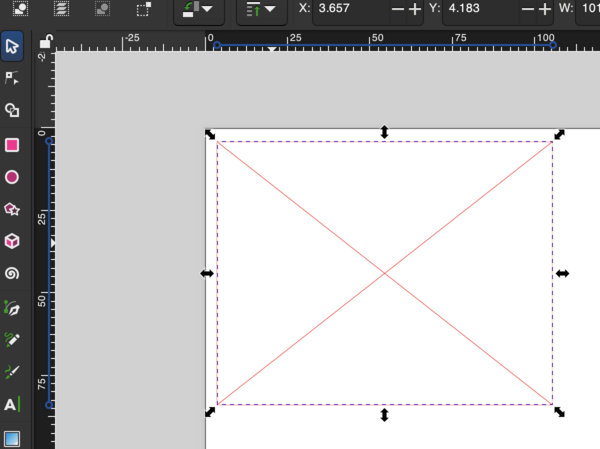
-
I order most of my scrolling wood from them. The service is impeccable, the quality is great, and they will replace a damaged piece, I have never had a need to do that. The shipping to NY is a little high, but as it is said, "You get what you pay for" Rick
-
I used Tru-Oil on the guitar I built about 4 year ago, and it still looks like new. GREAT STUFF!!! Rick
-
WOW Thanks for sharing. Rick
-
I'm back with another Inkscape question
Hudson River Rick replied to Hudson River Rick's topic in General Scroll Sawing
Once again, I THANK YOU all for trying to help me. While going through this process, I believe I hit the wrong button somewhere along the line (IMAGINE THAT???) Any how, I'm going to try one more thing before I throw in the towel, I am going to try to reinstall Inkscape to see if I can get it to behave. If that doesn't work, I will go back to my other hobbies, PULLING OUT MY FINGERNAILS USING CLAMSHELLS . Rick -
I'm back with another Inkscape question
Hudson River Rick replied to Hudson River Rick's topic in General Scroll Sawing
@don in brooklin on@Wichman Thanks for the quick reply from you both. Don, I did do the Open Recent, and only 2 of the 9 patterns are saved. I have no idea of what I did differently to the patterns that were not saved. I did name all 9 patterns, separately because we may want to print them out as needed. The reason for ordering these is to send any one of them to family & friends, 37 pieces. Wichman (sorry, I don't know your name) the lost files are not listed when the dialog box is selected. Since I have copies printed, can I just scan these in & try to save again. Thank you both for your help. Rick


