


Fab4
-
Posts
2,196 -
Joined
-
Last visited
-
Days Won
1
Content Type
Store
Profiles
How-To & Articles
Scroll Saw Reviews
Clubs & Organizations
Clubs & Organizations International
Pattern Shop
Suppliers
Village University
Help Desk
Forums
Gallery
eBooks
Everything posted by Fab4
-
Hi Gregg: Well, all I can say is you have me fooled They all look great Keep up the great work....rookie!!! Fab4
-

Good day here is some of my realisations Part 1
Fab4 replied to Christian Bergeron's topic in Bragging Rights
Salut Christian Merveilleux, tres bien faits Une question pour toi Chicago??? pourquoi pas Les Nordiques de Quebec ou Les Canadiens de Montreal ou Les Islanders de New York....lol Fab4(Paul) Excellent, well done Chicago??? why not the Quebec Nordiques, Montreal Canadiens, or New York Islanders...lol Fab4(Paul) -
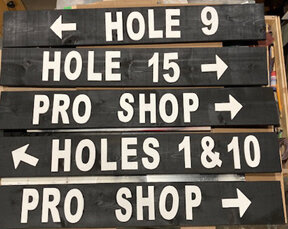
Eddie: Here's more free stuff to look for I replaced my ceiling tiles with 1/4" vinyl ones The scrap pieces from the tiles are so easy to cut and don't fuse together when cutting slow Made a few address signs and signs for a golf course with them. They are textured but still work Glued and brad nailed them to the board Will see in the long run how well they hold up These were not glued yet that's why they're crooked...lol Fab4
-
Hi Eddie Welcome aboard You can never go wrong with "FREE" Keep it up. It only gets better from here on in Fab4
-
Changed Pattern Types to Fretwork, Portraits, Intarsia/Segmentation, Lath Art, Compound Cutting, Puzzles, Toys, Boxes/Bowls/Baskets, Clocks, Home Items, Word Art, Other Changed Shop Information to
-
Hi older brother Paul Sr. They look great, is being a brother from another count as immediate family I hope so!!! I'll send you my address... Great idea BTW Fab4(Paul Jr.)
-
HI Tom: Sent you a message Fab4
-
Hi Tom: Your best bet would be to email Steve Good himself and run this by him He may reply, I know he doesn't always reply Put something like "URGENT HELP NEEDED" I'm not a Mac user so this is all I can suggest Good Luck Fab4
-
Call for Designers! - 2025 Ornaments For Charity
Fab4 replied to Travis's topic in General Scroll Sawing
message deleted -
Hi Michael: You're right, You never know good job on those Fab4
-
Hi Barb: Was there ever any doubt Glad to hear that you're in a panic, great problem to have Nice heart too Fab4
-
Hi Wich: How do you get scraps from cutting this I know I get scrap from cutting birdhouses and other compound cuts but from this i am not seeing it If your block is say 1.5"x1.5" don't you just cut out the spaces then you are left with the word. What am I missing here Thanks Fab4
-
Hi Marg: I can see why, That is an insane work of art, saying well done is an understatement. All the other people who entered the show are saying "Who in the heck is this Marg person" that's 2 years in a row now that she kicks our butts". You may be the only entry next year....LOL As best as you can, keep up the great work Fab4
-
Disaster struck and 1 weeks worth of scrolling gone
Fab4 replied to Allen levine's topic in General Scroll Sawing
Hi Allen: We all know that eventually "it happens". When it does we change the look by adding character to the design it now becomes a one of a kind and heaven forbid someone orders one like the one you just made... Totally agree about words or phrases used when "it" happens. Even the most mild mannered woodworker has a melt down once in awhile Great save as suggested above Fab4 -
Hi Don: How thick and what wood do you use for these? Fab4
-
Call for Designers! - 2025 Ornaments For Charity
Fab4 replied to Travis's topic in General Scroll Sawing
Hi Travis Sent by email I'm sure there will be more coming Thanks for doing this again this year Take Care Fab4(Paul)- 15 replies
-
- 2
-

-

-
- ornaments for charity
- pattern drive
- (and 1 more)
-
Hi Ed: Try this, I use it often. it does a good job 95% of the time Hope it works for you Fab4 Remove Background from Image for Free – remove.bgRemove.bghttps---www.remove.bg.ur---www.remove.bg.url
-
Hi Barb: I have to echo Scrappile's reply looks great - Fab4(Paul)
-
I know where you're coming from Denny. If this makes sense "it's scary good" for the non designers it's a fun tool to have but for the designers it has to be worrisome Fab4(Paul)
-
perfect...well done Barb Fab4(Paul)
- 15 replies
-
- 2
-
-
-
- kathy wise
- intarsia
- (and 1 more)
-
Just happy to hear that it worked out this time - Now get outta here and scroll on brother!!! As for the Hall of Fame, I have a long long way to go before that happens. As for Don. I nominate him to be in there ASAP.......
-
Index to Old Creative Woodworks & Crafts Magazine
Fab4 replied to raymondb's topic in General Scroll Sawing
Hope the Jays get their "hits" together before the playoffs start no comeback in site tonight. well done with the font Don -
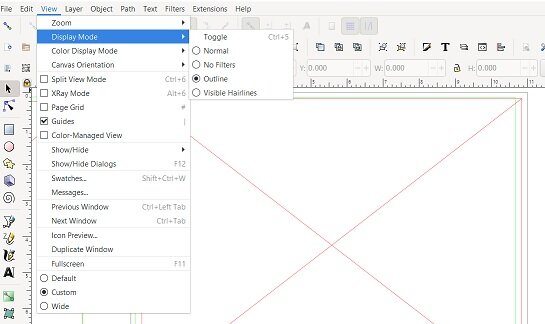
Hi Rick: I'm not on a Mac but this could apply The only time I get a RED X is when my settings are not right Under the VIEW menu look for DISPLAY MODE It should be on NORMAL. My attachment shows it on OUTLINE and this gives me the RED X If I put it to NORMAL my file shows up as it should So, if possible check under the VIEW setting and see what's there Hope this helps Fab4
-
Hi Kris: Looks like another winner but I have to tell you that the title on this one made me kind of wonder what the outcome would look like Bear in the woods - what do they actually do in there? I had an idea but your great design was totally different then what I was thinking.....Phew!!! Keep'em coming Kris, love seeing your work Fab4
-
Hi Frank: echoing all of the above replies Fab4


