


don in brooklin on
-
Posts
1,867 -
Joined
-
Last visited
-
Days Won
31
Content Type
Store
Profiles
How-To & Articles
Scroll Saw Reviews
Clubs & Organizations
Clubs & Organizations International
Pattern Shop
Suppliers
Village University
Help Desk
Forums
Gallery
eBooks
Everything posted by don in brooklin on
-

International Sports - Scroll Saw Challenge
don in brooklin on replied to Travis's topic in General Scroll Sawing
I have done a lot of ribbon racks for all sorts of sports. Here are just a few.
.jpg.5bcccf3d51b874d73701df76bfb07ff3.jpg)

- 19 replies
-
- 9
-

-
- sports
- scroll saw challenge
- (and 3 more)
-
I am a loyal Flying Dutchman user. I buy from Mikesworkshop and I mix and match within a blade type. I do group buys for club members. I usually buy Ultra Reverse but recently did a buy for polar. If you can only get a gross of one size maybe you can find someone near who likes Olsen and will split it. Don PS: When I buy blades it is about 3 - 3.25 per dozen if you buy a gross.
-
One thing that I have done a few hundred of is Steve Good name tags. Cheap easy gift and anyone with a unique name loves them. I have done them for teams. Put in # plus * plus name. Here is the link to online version https://stevedgood.com/stencil/ I prefer one you download and run on a Windows computer. It is in the blog but you have to scroll way down to bottom. The name plate maker is great for teachers.
-
I made these three flowers from a 6 foot fence board and a couple of scraps for the middle. Pattern from Scrollific on Scrollers Cafe forum.

- 30 replies
-
- 8
-
-
- spring
- scroll saw challenge
- (and 2 more)
-
Thanks for the pattern. My family lives and breathes baseball and these will be cute projects for my grandsons. May have done before they come back from next weeks road trip. One is going to Cooperstown and the other to Baltimore. I have taken your pattern and put into Inkscape so if any one else want to modify the name and number the pattern is below. Note. I put the name in the bat and am not sure it will be scrollable but you can move and put initials only. Both my grandsons are "CL" hence the change. COOP.svg
-
????????????????????????????????????????????????????
don in brooklin on replied to OCtoolguy's topic in General Scroll Sawing
I have lots of ideas and PHDs (projects half done). Also, 2 projects for our clubs 2x4 challenge BUT I have trigger finger and my hand cramps up often in the day. I have had this before and a shot of cortisone fixes it. Unfortunately, I could not get appointment till the first week of August and then in a couple of weeks after that I should have a couple of items that I am scrolling out of a 2x4s. -
I like the all red. I think the red hat ladies might buy this. I went back and looked at Frank's original and they are cool too.
-
Need a quick hostess gift and I made this real quick from wood unknown. (maybe brown maple) Pattern is from a CNC file. 7 inches in diameter and 1 inch high. Loaded with trail mix and nuts and wrapped in clear plastic and it was well received.

- 6 replies
-
- 13
-
-
I use a polar blade for 1 1/2 compound cutting but usually only a 5 or 7. A 12 would make it difficult to make any turns. You want to clear the saw dust. I have used #6 Pegas Skip tooth and they work well too. One thing that helps if hardwood it to wrap the wood with packing tape.
-
I just took the PDF and imported to Inkscape. Deleted all the text. Including the sizes. grouped each box and moved to an 8 1/2 x 11 page and printed on my Lenmark laser printer and the boxes are exactly 5 x 5 and 5 x 5 1/2. I would assume it is your print driver. I have had issues in the past, so I saved the svg as a PDF and print from Acrobat Reader and it will show you what is printing exactly. I have been doing a lot of designs larger than 8 1/2 x 11 so I just select all the items and group and then export to PDF making sure I specify the selection (not the page). Open in Acrobat and use the poster feature.
-
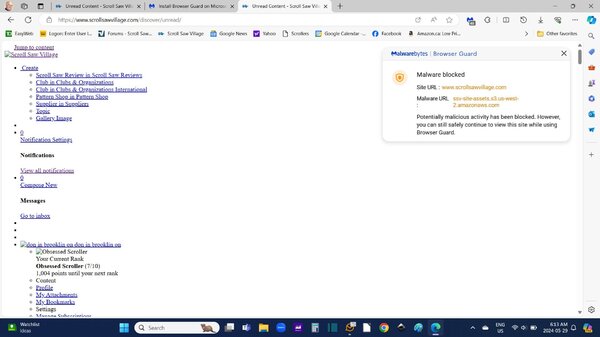
Good Morning
All of sudden today I got this screen. I am using Microsoft Edge with Malwarebytes.
I have added scrollsaw village as a safe site but still will not let me in like normal.
I can access in Chrome just fine. Does not have browser guard.
Has anything changed in the last day?
If nothing has changed I will reach out to Malwarebytes.
Thanks
Don
-
I agree with Witchman on the Polar blades. If you are attached to Pegas blades I have used Pegas skip tooth blades (#6) with success when cutting 1 1/2 ornaments. I think the issue is the reverse as it does not clear the saw dust as well. With cutting pine it is soft and sometimes the grain will make you go off the line. When cutting cutting thicker pine I will use a smaller blade like a #5 or even #3. You just have to slow down the feed rate. A #9 will tend to grab the wood more.
-
Great work. You have been busy. Love the crucifix. I really like the darker background. Is this the original size?
-
Bobby is on Facebook too. https://www.facebook.com/bobby.riggs.54/about
-
Have you checked out https://woodenteddybear.com/collections/flying-dutchman-scroll-saw-blades Same company as Mikes Workshop. They say they ship internationally via UPSP. I have order gross at a time to Canada and I have any problems. Never been stuck at customs. Usually take a week to 10 days. Are you looking for 2/0. They have those listed in ultra reverse and scroll reverse.
-
Barb. The banks still take them but some require them to be wrapped. The problem maybe is to where to get penny wrappers.
-
Looks good. Like the darker top. I thought being close to Ottawa where all the big buck politicians live, you should have a loonie drop. LOL
-
Fill & Stroke in Inkspace
don in brooklin on replied to Insane Dust Maker's topic in General Scroll Sawing
Can you see the screen shot above? I have live pretty view clicked. I am using the defaults. Brightness detection 4.5. -
Fill & Stroke in Inkspace
don in brooklin on replied to Insane Dust Maker's topic in General Scroll Sawing
Here is a screen shot after I imported the B&W PDF to Inkscape and hit "Trace Bitmap" so you can see my default parameters. Don't forget to hit apply. Let me know if you have any other problems.
-
Fill & Stroke in Inkspace
don in brooklin on replied to Insane Dust Maker's topic in General Scroll Sawing
I have the latest version of Inkscape and have the same problem. To get around this problem I export to PDF. Open in Acrobat and I have to make sure the "Choose paper source by PDF paper size" is clicked. I occasionally have objects that don't print and I do the same thing and they are there. Bug in Inkscape communicating with printer driver. (so I was told) -
Fill & Stroke in Inkspace
don in brooklin on replied to Insane Dust Maker's topic in General Scroll Sawing
If this is a Russ Beard file it is available in Black and White and Red at https://www.facebook.com/groups/3356476637909790 under files section. I took the Black and White version from the facebook page and imported to Inkscape, did trace bit map. change stoke to red, fill to gray and this is the result. Same as Russ's red version. Here is a clip of upper corner so not to show complete pattern.
-
Fill & Stroke in Inkspace
don in brooklin on replied to Insane Dust Maker's topic in General Scroll Sawing
What is the document properties under preferences. It looks like you have it set to letter instead of ledger 11x17
-
The angle will change. You can calculate the angle here https://www.scrollmania.com/ This is from Carole at SSW Now, down to business. If you go to Dave's program (AngleCalc), enter the thickness of your wood as a decimal. Then, enter the ring width, also as a decimal. Go to where it says "angle" and click on "solve". The correct angle should appear. Round the number up, if necessary, and add one degree. That should work. However, to play it safe, send me a PM with your specs and I'll compute it for you. That way you can check your own work, and not risk ruining your wood.
-
Fill & Stroke in Inkspace
don in brooklin on replied to Insane Dust Maker's topic in General Scroll Sawing
I don't have a 11x17 printer so when I have some thing large I just save as a PDF and use the poster function in Acrobat Reader. 11 x 17 prints on 4 pages. One thing you have to do is change your document size in Inkscape to 11x 17 and set at portrait or landscape. To create a multi page PDF you have to open the pages tool in the bottom left. Add pages as you want. Inkscape will only print the page you are on. To print all at once export to PDF and print. -
That is a really cool idea. I have made a lot of ribbon racks for various sports and this is a great. I have always used dowels or shaker pegs but this looks a lot easier.(and cheaper) Never thought of French cleat might have to steal the idea. Thanks for posting- Well done.


.jpg.5bcccf3d51b874d73701df76bfb07ff3.jpg)


