


don in brooklin on
-
Posts
1,867 -
Joined
-
Last visited
-
Days Won
31
Content Type
Store
Profiles
How-To & Articles
Scroll Saw Reviews
Clubs & Organizations
Clubs & Organizations International
Pattern Shop
Suppliers
Village University
Help Desk
Forums
Gallery
eBooks
Everything posted by don in brooklin on
-
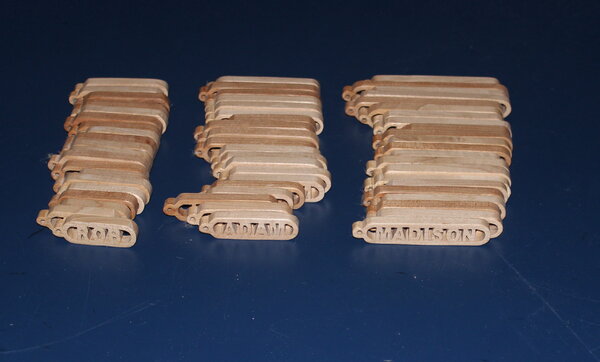
I just finished the keychains on the Papa do list. ( Actually I suggested.) 60 keychains for the teachers and stall at her new school. Cut in maple, FB UR#1 and 3. Dipped in 50/50 shellac/alcohol. Buffed with carnaubawax
- 11 replies
-
- 19
-

-
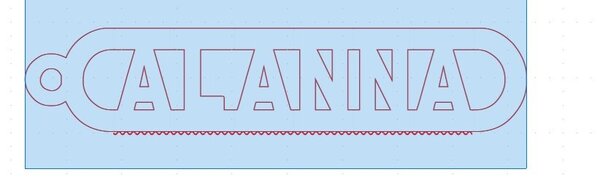
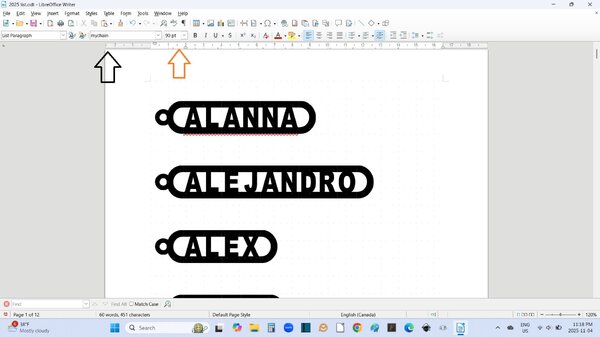
I have checked an the link https://www.stevedgood.com/stencil/ works on Window machine. OR . check to see if your computer has mychain.otf or mychain.ttf if so you can use any word processor or Inkscape to generate keychains. period starts the chain and slash ends it. I use 90 point type. If not, you can do in Inkscape if you are so inclined. Here is my svg that I use when I do not want to use the Arial heavy font. Let my know if this is okay and I can provide more instructions. Or as last resort do as FAB4 says. You may not get and answer but check in a couple of days to see if fixed. PS: I do a lot of keychains (just finished Christmas order of 60 chains) so I tend not to use the individual keychain maker when doing multiples at a time. KEYCHAIN.svg
-
Bobby's email is [email protected]
-
That is how I found it on Bobby Riggs site. I used the Bing search - same thing.
-
That pattern I think is from Bobby Riggs aka Scrollriffic Crosses If you email him to find out the availability http://[email protected]
-

Scroll Saw Workbook….Completed!
don in brooklin on replied to Roberta Moreton's topic in General Scroll Sawing
Well done. Love the baskets -
WOW really looks nice. I like the colours on all pieces. Never in my life have I ever "pushed through" a piece of Intarsia. They usually stay as PHD's (projects half done) for a while. Good luck in your next sale.
-
Call for Designers! - 2025 Ornaments For Charity
don in brooklin on replied to Travis's topic in General Scroll Sawing
Travis what is your deadline? I just need to get 1 more idea- 15 replies
-
- 1
-
-
- ornaments for charity
- pattern drive
- (and 1 more)
-
Well done. I love the compound name plate. Where did the bonus come in?
-
I have compiled the index for the Ornaments for charity. index ornament for charity.xlsx
-
INKSCAPE strikes again !!!
don in brooklin on replied to Hudson River Rick's topic in General Scroll Sawing
The only thing I can think of is that you have to increase the threshold to make it show, Can you post the image and I will try. If an issue to post send it via PM. -
INKSCAPE strikes again !!!
don in brooklin on replied to Hudson River Rick's topic in General Scroll Sawing
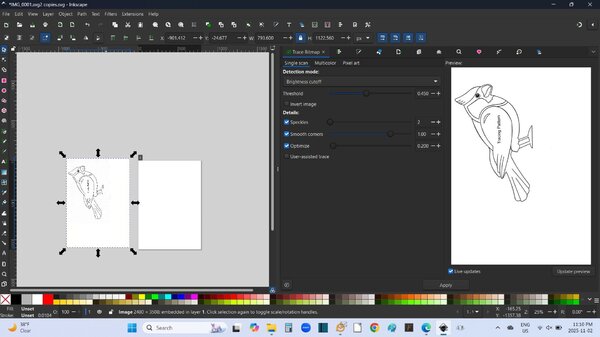
Down at bottom is live updates clicked on? You also need to click on image before trace bit map. Once you hit apply the path is on top of image. Don -
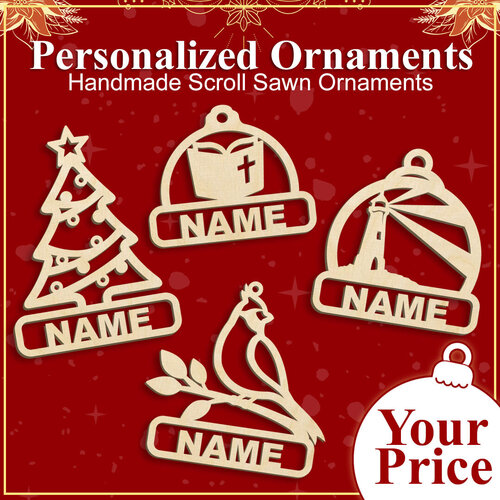 cswilliams1693 posted he was having trouble with this. Not rocket science = Download the zip package - extract all Now select the svg you want. I did CustomHolidayOrnaments2025_US-Letter Select pattern you want and add name. Easy - if you follow the instructions ++++++++++++++++++++++++++++++++++++++++++++++++ I do patterns for fellow members of our club (N/C) and I had 2 unique request this year. 1. A member order 6 different patterns from previous and this years pattern. Everyone had the word NOEL as she was not sure who was getting which. 2. Another person asked for 2 names. Pattern looks okay. I did both with the & on the top line and bottom and he was going to choose. He has a "few" more to do once he cuts one.
 -
Thanks for the tip. I use LibreOffice and it works great.
-
I use 3/8 inch. Usually maple.
-
I make a lot of key chains and I normally use Steve Goods program. On the Daddy do list is 57 key chains that my daughter wants to give to the staff and teachers in her school. She provided me a list in word and so instead of keying them individually in to Steve Goods program, I added a period to the first of each name and the / to the end. Selected all and change font to my chain and font size to 90 and all done. No typos no proofing. Now with about 6 weeks till she needs them just need to do 10 and week,
-
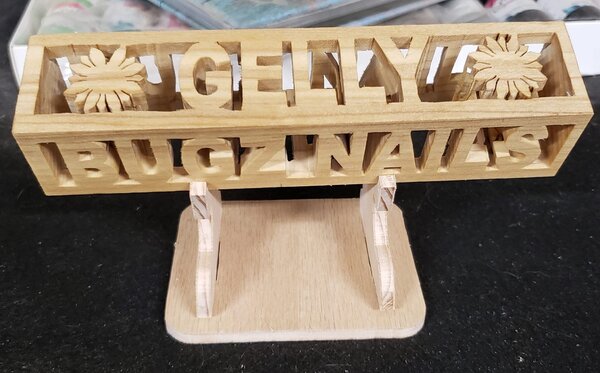
There is a good post by the Artisan pirate on how he does it. https://www.scrollsawvillage.com/forums/topic/49694-how-do-you-make-a-compound-cut-pattern/#comment-520047 I make block in Inkscape you would just have to add the key ring. Here is a picture cut by Mimi.
-
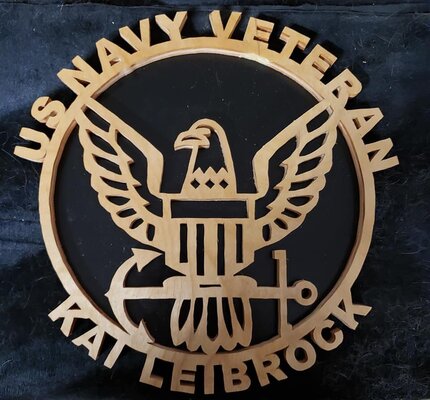
HI I do a similar pattern for mimi. It was an original Steve Good pattern. This is for US Navy Vet but I do the same for US Navy . the logo is different??? I created a circle the right dimension and take the text (Arial heavy) and text>put on path. Then I have the text touch circle and do union. I see Steve's pattern is glued to a backer. I might take the backer make a little bigger and then take the letters and glued to backer at the bottom in a circle. If this seems outside your comfort zone you can send me the name in upper and I can see what I can do and what pattern Don
-
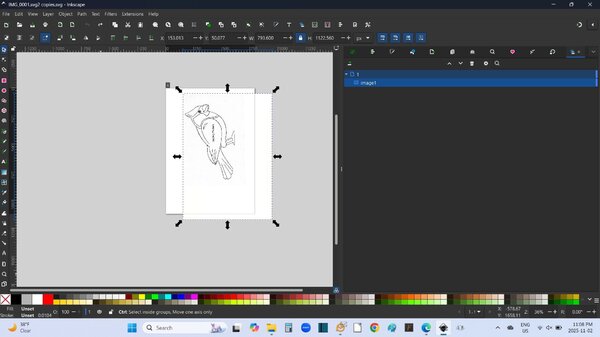
I down load and open in Inkscape I get the image on top of the Inkscape canvas. If you select the image you get get the arrows. Note it I double click on the downloaded file the image is directly over the canvas but same to get off the canvas. Now drag the image to left or right. I went left and then path-trace bit map, If you have any other questions please let me know.
-
I won't buy any issue. I wait until they come available on DVD. I have issues 1 - 84. All patterns avaliable. I got an email yesterday that the DVDS where 50% off. Don't know if specific to me but worth call. Last time I talked to customer service they said USB stick could be made avaliable but no digital download. Now waiting for 85 - 96.
-
Barb. the script is scrollscriptmt The block is a variation on Times new roman bold. I have never font a scrollable version to this font so I add my own bridges. I tested out


-
I have EX-21 that I have had for 14 years now and it is great still. This is a normal wear situation. You can get a repair kit from Seyco https://seyco.com/product/ex-trk-normal-wear-parts-replacement-kit-for-top-tensioner-assembly/ or I replaced my my blade holders with Pegas holders. I got mine from https://artcraftersscrollsaw.com/
-
The pattern by bobscroll is there as a PDF too and as a png. The pdf of those ornaments is below.. For the png . use image tools, download to drive, open with paint and then print. No black area. Police & Fireman ornaments.pdf
-
Can you post a link to the pattern you are looking at? I see black but it does not normally print that section.
-
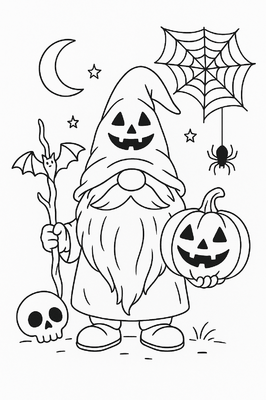
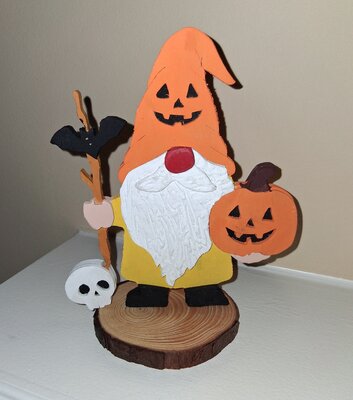
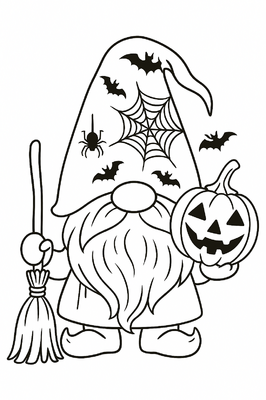
I thought I would give a try to AI to generate a pattern of a Halloween Gnome. I asked Chat GPT for a "line art of Halloween gnome" and got back this image. I then stacked a 1/8 and 1/4 bb. Just cut the perimeter of the gnome ignoring the objects out side this(moon , cob web etc.) and the interior cuts. Now cut the interior segments. Real easy no playing in Inkscape. Beard doesn't show well but used mixture of drywall paint and white acrylic I also used Copilot and it came back with a very similar pattern.
- 13 replies
-
- 11
-


