


Scrappile
-
Posts
16,215 -
Joined
-
Last visited
-
Days Won
335
Content Type
Store
Profiles
How-To & Articles
Scroll Saw Reviews
Clubs & Organizations
Clubs & Organizations International
Pattern Shop
Suppliers
Village University
Help Desk
Forums
Gallery
eBooks
Everything posted by Scrappile
-
Nice, your puttering exceeds what I call hard work.
-
Very well done, Dick. That does look like a challenging cut.
-
Absolutely beautiful!
-
Beautiful cutting!
-
Well, the hobbies also keep us with not-so-artistic minds busy. I am just good enough to cut out the black and leave the white or whatever the pattern dictates. In my world, the pattern makers are the artists.
-
I am posting info copied from a response @Wichman did in 2024, on how to create a gallery. It is not intuitively obvious how to get there, but it is not really hard. Once you create one, you will have a "Galleries" option in your profile that will take you to your galleries. "At the top of this page: community > member gallery > scroll down to the galleries, not far, click on blue button > add images > follow prompts. " You are, I think, allowed 100 pictures per Gallery; however, you can create more than one gallery. You can show any project you cut as long as it is not profane or lewd. The first one or two pictures require approval from the forum owner. There is a space to give credit to the pattern designer. @Travis, please correct me if I am wrong. And welcome to the Village. Looking forward to seeing your input.
-
Careful @Dave Monk! If you look into or get into pen making it is another hobby that can consume your life! I am a recovering pen maker, Never got to the level of @JTTHECLOCKMAN, but it consumed me. I go back and look at it nowadays and they have some amazing hardware and blanks I would have never dreamed of.
-
WOW! Yes that is beautiful! How is the lid hinged? Pegs?
-
Pretty neat! I wonder if AI could put in bridges to make a fretwork scroll saw piece.
-
Well done
-
That is great! Yes, a cute little owl.
-
Very nicely done.
-
Can't wait to see what you are working on.
-
OUTSTANDING!
-
Job well done, Jerry!
-
Well done.
-
That would have been a good one for our kitchen. Well, until I had to start doing some of the cooking. Now the jury is still out. How many ways can a person fix canned chili over hot dogs?
-
Nice Chess set. I am just preparing to start making two. One for each grandson. May never get completed, but worth a try.
-

Hello on top of the Cumberland Plateau of TN
Scrappile replied to Garry Brpwine's topic in Introductions
Welcome to the village. Have never heard of or seen the gauge you mention. Would love to see a picture of it if you find one. -
Very well done!
-
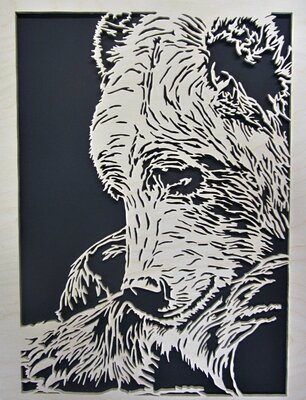
I finally finished cutting something. Took me weeks; I do not spend much time on the saw anymore. Something about getting old. I can only do short sessions. This is a H Botas pattern. I am a bear fan.
- 14 replies
-
- 19
-

-
I agree, simple but elegant. Well done.
-
Another great cutting!
-
Great scrolling of a great picture.


